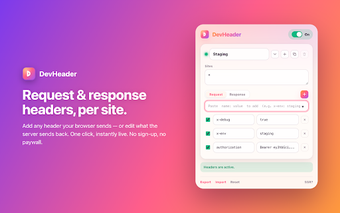
DevHeader: Privacy-focused HTTP header editor for web developers
DevHeader - Header Injector & HTTP Header Editor, developed as an open-source privacy project, is a Chrome extension for web developers, testers, and security researchers. It lets users modify HTTP requests and responses and intercept calls to simulate server behavior for debugging. The extension emphasizes local control and a minimal permission model; its small, auditable codebase makes it practical for quick API experiments and short-term debugging sessions. Use cases include CORS debugging, feature-flag testing, and endpoint redirection during development.
What is DevHeader used for?
DevHeader is a browser-side tool that targets in-browser HTTP manipulation for debugging and testing. The extension can modify, add, or remove request and response headers, perform URL-based scoping for rules, and rewrite request URLs using substring or regular-expression matching. It also supports response mocking so developers can simulate server responses without changing backend code. These capabilities focus the tool on API testing, CORS workarounds, and local feature-flag experiments.
How does DevHeader handle privacy and permissions?
Privacy and permissions are part of the extension's design: it is built on Manifest V3 with a least-privilege approach. Key facts:
- No broad host permissions required by default.
- No external network calls initiated by the extension itself.
- All configuration stays in the browser storage, and the codebase is open for auditing.
How does DevHeader support API testing and debugging workflows?
The extension includes features that map directly to debugging tasks: a mock API engine intercepts fetch and XHR and returns synthetic status codes, bodies, and headers; a DevTools panel captures live requests and converts them into mock rules; and autocomplete helps fill common header names and values. Developers can also use header edits to add response values like Access-Control-Allow-Origin to diagnose CORS problems during development.
How well does DevHeader fit Chromium workflows and team use?
DevHeader runs on Chrome and other Chromium-based browsers such as Edge, Brave, and Opera, making it portable across common desktop browser environments. It exposes profile import/export as JSON for backups and handoff between machines, and named profiles let individuals switch environments quickly. The project emphasizes a minimal UI and no analytics, which keeps daily use focused and avoids UI clutter.
Focused tool for individual developers and small teams with local workflows
DevHeader is a pragmatic choice for developers and security testers who prioritize local control and an auditable toolchain, because its design keeps configuration and activity on the device. Expect a trade-off: the local-only model and minimal scope suit quick, on-machine debugging rather than centralized configuration management across many users. For single-developer debugging and short test cycles, it provides a compact, privacy-minded workflow.